Step 1: Create an Authoring Account on Torus
To create or customize content, you’ll need an Authoring Account on Torus.
If you previously had an Authoring Account on Argos, please note that those accounts will no longer work after November 2025.
To continue creating and customizing Infiniscope content:
-
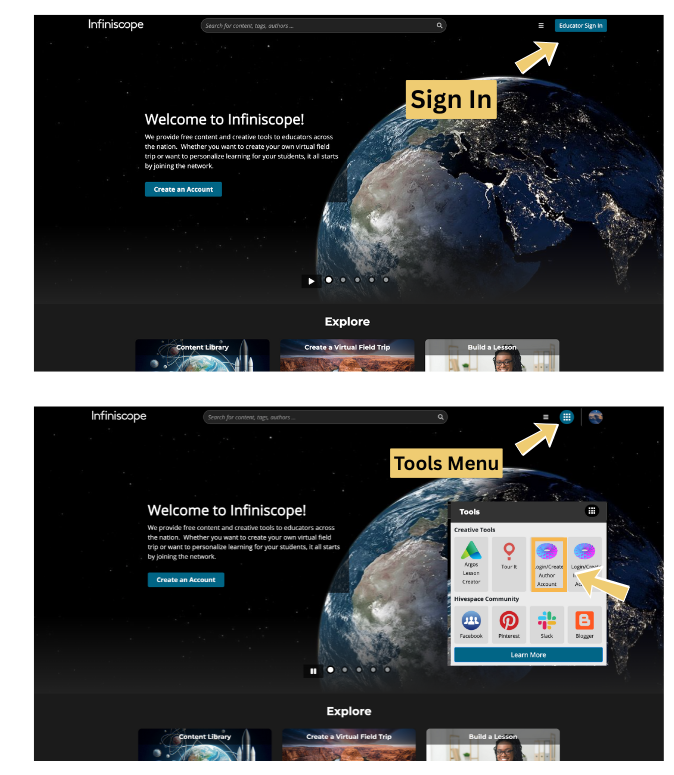
Sign in to your Infiniscope account.
-
From the Tools menu, select Login/Create Author Account. This will take you to Torus, where you can create a new authoring account.
- Verify your email address to complete your account activation.
Need more help? See our Step-by-Step Guide on Creating an Author Account
If you already have a Torus authoring account, you can move on to Step 2.
Step 2: Request a Copy
Once your authoring account is active, complete the form below to request a copy of the activity you want to customize.
You will need:
-
The name(s) of the activity or experience you’d like to customize
-
The email address associated with your Torus account
We’ll duplicate the content into your Torus workspace and notify you when it’s ready.
You’re Ready to Start Customizing!
After your copy is available in Torus, you can:
-
Edit text, images, and media
-
Add or remove screens and questions
-
Personalize feedback and flow
-
Adapt the experience to meet your students’ needs
Need guidance on using the authoring tools? See our Advanced Author Wiki